Hiển thị các bài đăng có nhãn blogger. Hiển thị tất cả bài đăng

Thứ Hai, 12 tháng 12, 2016

World's Biggest chicken egg

     The image given below is the egg laid by an ordinary hen which is 6.3 centimeters wide and 9.2 cm long and weighs 201 grams three times heavier than an ordinary egg.

   The  Biggest chicken egg was laid by a hen in northeast China's Heilongjiang Province.It looks like any other chicken egg, except that its shell is a bit rough. 


 Photo: The Biggest chicken egg and an ordinary chicken egg


Thứ Hai, 28 tháng 12, 2015

How to animate bloggers browser title bar?

     One of the website attracting way is animating title bar, it will reduce the website idl state time. It is very easy to place it.

Example image
     This screen was taken from chrome browser. Can you see the title bar of the window is rotating, this also rotating in the windows status bar.


Animate title bar in blogger
Add animation press here

     If the above button is not work or want to modified the title name follow the steps, otherwise leave all the below steps.
Step 1
     Login to your blogger by entering your username and password.


Step 2
     Select your blogger, by clicking Go to post list  button.

Go to blogger post list

Step 3
     Go to layout and press Add gadget.

Add Gadget in blogger


Step 4
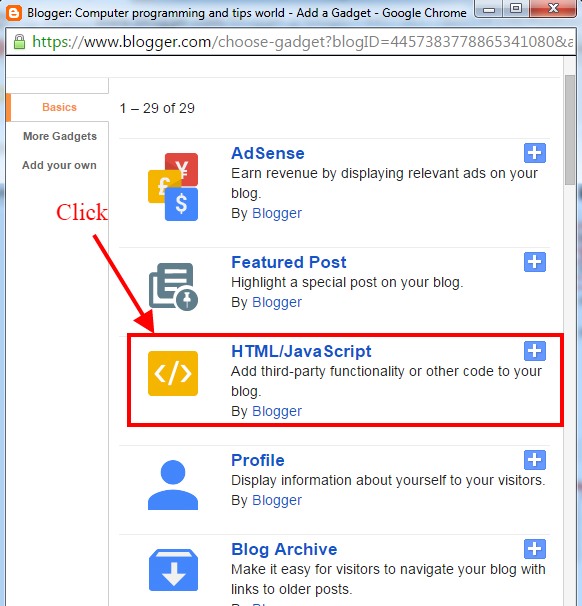
     After press the Add gadget a popup window is opened, in that window scroll and select the  HTML/JavaScript.

Add HTML-JavaScript Window in Blogger


Step 5
     Another window is opened and ask Title and Content, leave the Title field and copy the below code and paste it to the Content box.


<script type='text/javascript'>

msg = document.title;

msg = msg + ".";

position = 0;


function scrolltitle() {

  document.title = msg.substring(position, msg.length) + msg.substring(0, position);

  position++;

  if(position > msg.length) position = 0

  window.setTimeout("scrolltitle()", 110);

}

scrolltitle();

</script>

Paste the html-javascript code on blogger

Note:
     If you want to change the title text with extra text, add the text after or before the msg = msg+".";
eg: msg="My extra text "+msg;

Step 6:
     Finally save it and open your blog url, your title is animating.


Chủ Nhật, 20 tháng 12, 2015

How to unpublish published post from blogger?

     In some situation we need to hold or pause some posts in blogger without remove, in that time we can follow the following steps.


Step 1
     Login to your blogger.

Sign in to blogger

Step 2
     Select your blog from lists of blogs.


Step 3
     Select the posts from the lists and just press the Revert to draft button to unpublished the post from blogger.

Unpublished the post from blogger


Step 4
     Now selected posts are unpublished (not removed just hold)  and saved in draft menu, you can again publish the same post by pressing Publish button.

Publish the blogger post from draft